



Thread Dump Analysis Powered by AI

Deterministic Precision with Conversational Intelligence

An advanced thread analysis engine built on deterministic parsing and conversational intelligence. Instantly detect and resolve complex thread issues like deadlocks, blocked threads, and CPU bottlenecks across Java applications.

  • Chat with your Thread Dumps
  • Zero Guesswork, 100% Data Accuracy
  • Detect Deadlocks & Blocked Threads Instantly
  • Identify CPU Bottlenecks in Seconds
  • Trusted by 10,000+ Enterprises

Upload Thread Dumps

Upload Raw Thread Dumps

Rest API (Introduction video)

  • POST HTTP request to API end point https://tst-srv-jdk11.ycrash.io//fastthread-api?apiKey=Testing@f05b4d6c-4aad-4d37-b47b-92b809841339
  • The body of the HTTP request should contain the thread dump
  • HTTP response will be sent back in JSON format

See complete documentation here

AI Thread Analysis (Beta)

    Add files
    Submit

    World's #1 choice for Thread Dump Analysis

    Finest addition to your DevOps Toolbox!

    Made by the engineers, for the engineers

    Toolbox Image
    We Decode Thread Behavior, AI Explains the Problem

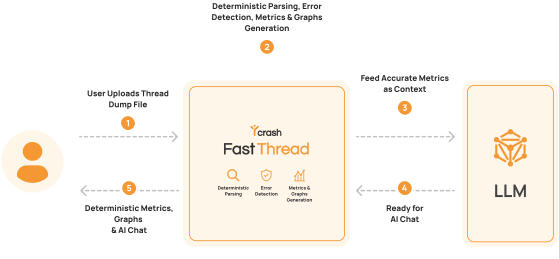
    Thread dumps are complex, unstructured, and difficult to interpret manually. fastThread decodes thread behavior deterministically to extract meaningful insights. AI then explains the problem clearly, so you can act faster with confidence.

    Deterministic Thread Parsing: Our engine extracts precise thread states, stack traces, lock ownership, and contention patterns with complete accuracy.

    RAG-Based Contextualization for Threads: We convert raw thread dumps into structured, high-signal context so the AI focuses only on relevant execution insights.

    Grounded, Execution-Aware Insights: All AI responses are based on validated thread data, ensuring explanations reflect actual runtime behavior—not assumptions.

    Reliable, Secure & Hallucination-Free: By separating analysis from explanation, we eliminate guesswork and deliver consistent, trustworthy insights without exposing sensitive data.

    Toolbox Icon Instant Root Cause Analysis

    Did your application's CPU spiked up or resulted in OutOfMemoryError or became unresponsive? Just upload your thread dumps to fastThread and see the root cause instantly.

    Toolbox Icon Online thread dump analyzer

    There is no hassle to register, download and install the tool in your machine. Just upload your application's thread dump files & see the analysis reports.

    Toolbox Icon Brilliant UI

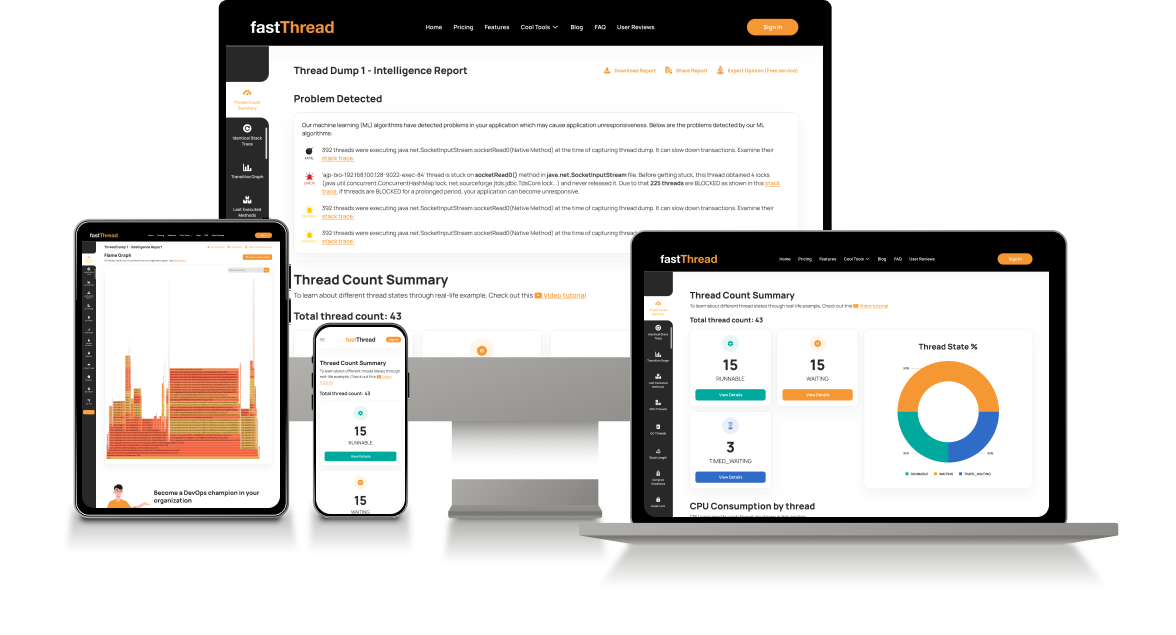
    Stunning dependency graphs, Flame graph, call tree and table view of the thread dumps are presented intuitively in one easy to understand online report.

    Toolbox Image

    Toolbox Image
    Thread Dump Analysis REST API

    In this modern world, thread dumps are still analyzed in a tedious & manual mode. i.e., Operations engineer captures thread dumps from the production servers; then he transmits those files to developers. Developers use thread dump analysis tools to analyze thread dumps manually.

    There is no programmatic way to analyze thread dumps proactively. Given this tediousness, it's impossible to analyze hundreds of JVM's thread dumps in one stroke. Thus to eliminate this hassle, fastThread has built the industry's first (and only) REST API to analyze thread dumps. With one line of code, you can get all your thread dumps analyzed instantly.

    Universal Java thread dump analyzer

    Based on the Java version, JVM provider, and tools used to capture, thread dump format varies. Some monitoring tools generate thread dumps in JSON format as well. fastThread is the industry's first online JVM thread dump analyzer that can analyze all formats of thread dumps.

    • Java version: 1.2, 1.3, 1.4, 5, 6, 7, 8, 9, 10, 11, 12, 13, 14, 16, 17, 18, 19, 20, 21, 22, 23, 24, 25
    • JVM Provider: Oracle, IBM, HP, Azul, OpenJDK
    • Tools: jstack, kill -3, jcmd, JMX MBeans, APM tools

    Thus we are proud to be called as a Universal JVM thread dump analysis tool.

    Toolbox Image

    How it works?

    • Capture thread dumps

      There are 8 different options to capture thread dumps. Use the one that suits you.

    • Upload Thread Dumps to fastThread AI

      Upload your thread dumps to our deterministic engine to extract 100% accurate insights instantly.

    • Chat with Thread Dumps

      Ask our AI for root cause analysis, deadlock detection insights, and instant troubleshooting recommendations.

    • You can also use REST API

      To analyze hundreds/thousands of JVMs thread dumps in a proactive manner, use our REST API

    Features

    fastThread is the DevOps engineers favorite thread dump analysis tool to troubleshoot complex production problems.

    Feature Icon Machine Learning

    Our machine learning algorithms and expert thread dump analysis patterns are applied to every single thread dump. These patterns not only detect but also forecast CPU spikes, hung threads, and several such problems.

    Feature Icon Android thread dump

    fastThread parses the thread dumps generated from Android application and generates instant root cause analysis report which contains flame graphs, call trees and transitive dependency graphs and several more intuitive views.

    Feature Icon hs_err_pid analysis

    A crashes or fatal error causes a JVM to terminate abnormally. When JVM terminate abnormally it creates hs_err_pid file. This file has lot of information, fastThread helps you to analyze this hs_err_pid file effectively.

    Feature Icon Core dump analysis

    Java core dump has lot of rich information but in a hard to understand/digest format. fastThread.io can analyze Java core dump files and provide you precise information in a graphical format.

    Feature Icon Flame Graph

    Thread dumps tend to span for several hundreds of lines. fastThread condenses big java thread dump files and generates one easy to understand flame graph. These flame graphs are searchable, zoomable and color coded.

    Feature Icon Call Stack Tree

    It's hard to scroll through every single line of the stack trace in each thread. Call Stack Tree consolidates all the threads stack trace into one single expandable/collapsable tree. It makes the thread dumps navigation much simpler and easier.

    Feature Icon
    top -H thread dump

    Unix command 'top -H {process-id}' displays Ids of the threads running in the application and amount of CPU & memory they consume. fastThread generates the CPU | Memory section, when you upload 'top -H' output along with thread. This section will show all threads stack trace, their CPU, and memory consumption.

    Feature Icon Advanced Search

    When there are several hundreds of threads in the thread dump, you might want to search threads based on thread name, Id, thread priority, stack trace, class name, package name, method name. fastThread provides this advanced search capability.

    Feature Icon Table View of thread states

    A thread can switch between one of these six states: RUNNABLE, WAITING, TIMED_WAITING, BLOCKED, NEW, TERMINATED. When you analyze multiple thread dumps, you might want to track all the thread's states in each dump. fastThread provides Table View, where you can track each thread's state visually.

    Features Screenshots

    Learn JVM Performance and Troubleshooting

    Watch A Preview

    Placeholder Image
    TRAINING COURSE

    Learn JVM Performance and Troubleshooting

    • Become a world class JVM performance expert
    • Troubleshoot production performance problems in a fraction of time

    Instructor: Ram Lakshmanan, Architect of GCeasy

    What's included:
    • 9 hours of video series with case studies and real life examples

    • 3 months yCrash tool subscription

    • e-books and study material to complete this course

    • LinkedIn shareable certificate

    • 1 year course subscription

    Attended by engineers from all over the world from the premier brands

    4.8 Stars Learner Rating

    Hall Of Fame


    yCrash Certified Engineers in
    Performance & Troubleshooting

    Highlighting engineers certified in diagnosing and
    optimizing applications.

    Kris Murray

    Kris Murray

    With over 21 years of professional experience, Kris Murray is currently employed full-time at CloudBees as a Development Support Engineer.

    Designation
    Development Support Engineer
    Experience
    21+ yrs
    Company
    Cloudbees
    Kris Murray

    Subijay Bhattacharya

    Have 18+ years of experience in Telecom and Insurance domain and worked on Java/J2EE, Hybrid Android

    Designation
    Product Architect
    Experience
    20+ yrs
    Company
    Motive
    Kris Murray

    Brijmohan Singh

    Specialties: Agile, SCRUM , Product manager, Portfolio manager, Technical Account Manager (TAM), Collection & Recoveries

    Designation
    Senior Manager
    Experience
    16+ yrs
    Company
    CRsoftware

    Testimonials

    What does major enterprises say about fastthread.io?

    J.vasiltsov CFT

    Anhui NCS,
    Singapore

    Chan.upen

    Abhishekdesilva

    Carlos PERFORMANCE ENGINEER

    Testimonial Image
    J.vasiltsov
    CFT

    Thank you very much!
    Your report was very usefull and helpful. It contains many illustrations and graphs. This report had attracted my attention to a problem I missed during manual parsing the thread dump.
    Thanks again!

    Testimonial Image
    Anhui
    NCS,
    Singapore

    Very good tools to analyse java dump. thank you. it will be much helpful if it is product that can be download-able though it is chargeable, i would like to recommend my customer to buy it.

    Testimonial Image
    Chan.upen

    Its realy magical as you plot everything from the thread dump file. It saves alot my time and makes my work easier by quickly analyze the dump and providing very very useful report. Thanks a lot for this.

    Testimonial Image
    Abhishekdesilva

    I am a developer and this certainly did help me to further investigate the client's issue. I thank you for your service.

    Testimonial Image
    Carlos
    PERFORMANCE ENGINEER

    I did not expect such quick report, and so comprehensive, it allows someone to find out RCA and reply immediately, keep it up!

    FAQ

    Frequently Asked Questions. If you have further questions mail us: support@tier1app.com

    How to take thread dumps?

    There are multiple options to take thread dumps. Here is our article which provides you 9 different options to capture thread dumps.

    Can tool parse thread dumps only?

    Besides parsing thread dumps, fastThread can also parse core dumps and hs_err_pid files as well.

    Can you clarify licensing on reusing the reports and graphics?

    You are welcome to use the graphics and other metrics provided by the fastThread tool in your blog post or company report by specifying accreditation "Generated by fastthread.io" at the bottom of the graphics.

    fastThread isn't able to parse my thread dumps?

    We parse multiple thread dump formats. But still we keep uncovering new formats of thread dumps. If you can email your thread dump to support@tier1app.com, we will enhance the tool to parse it, right away.

    Can I look at sample thread dump analysis reports?

    Ofcourse. Here are sample thread dump analysis reports generated by fastThread: